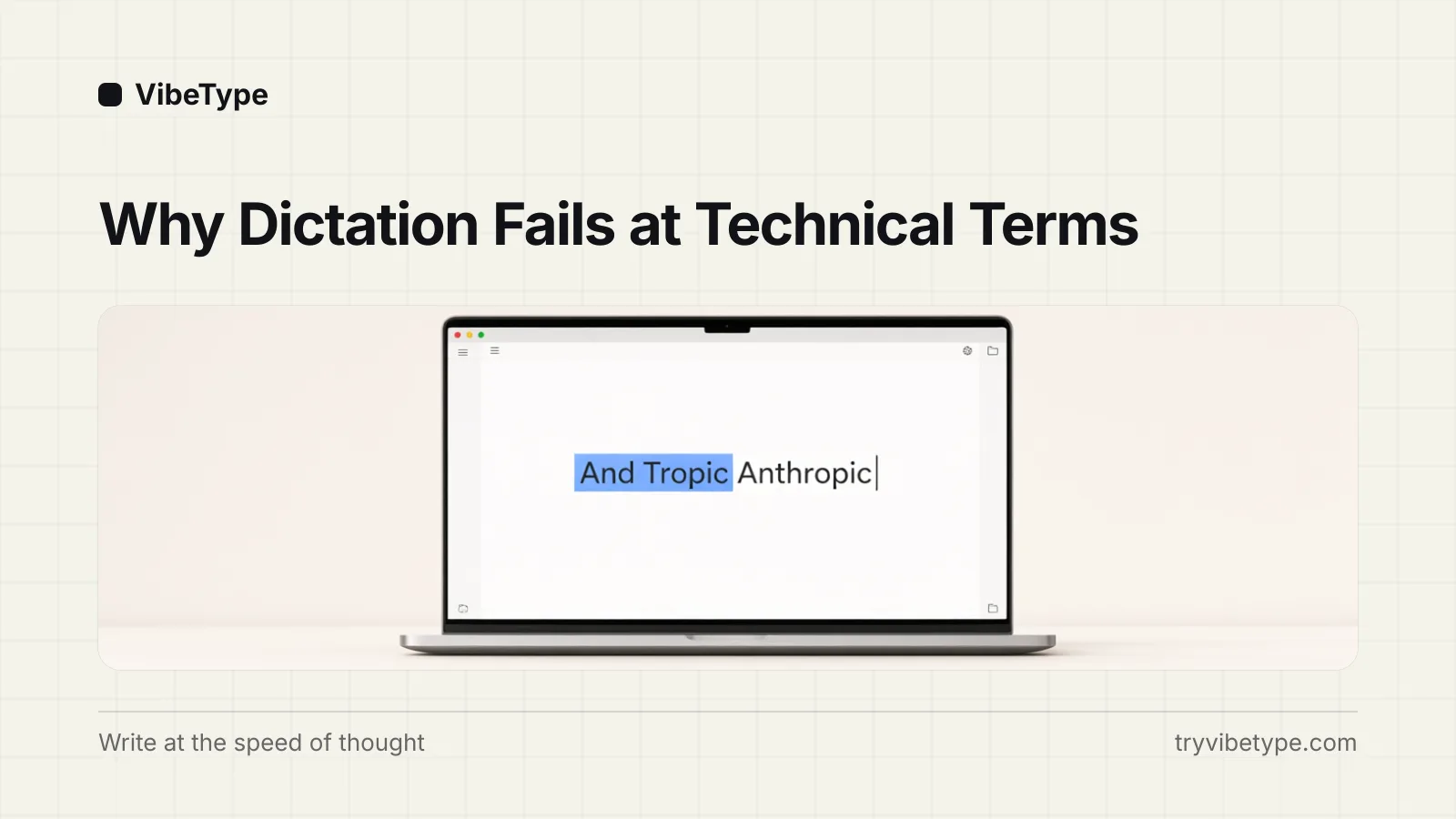
Wispr Flow vs Superwhisper vs VibeType: cloud polish, local power, or local simplicity?
Three dictation apps, three architectures. Where each one transcribes decides its price, its privacy, and its setup time — and there is an honest pick for each kind of user.
 Abhilash KasliwalFounder, VibeType7 min read
Wispr Flow is the polished cloud option: about $15 a month, runs on Mac, Windows, and iPhone, and needs the internet because transcription happens on its servers. Superwhisper is the powerful local option: $249.99 lifetime, models run on your Mac, and it rewards people who enjoy configuring them. VibeType — which I build, so read accordingly — is the simple local option: $79 lifetime or $29 a year, one hotkey, no model menu, dictation fully offline. Most of what separates them follows from the first clause of each description, because architecture decides price, privacy, and setup before features enter the picture.
| Wispr Flow | Superwhisper | VibeType |
|---|---|---|---|
Transcribes | On their servers | On your Mac | On your Mac |
Price | ~$15/month | $249.99 once (free tier) | $79 once, or $29/year |
Best for | Teams, cross-platform | Model tinkerers | Offline by default, zero setup |
Dealbreaker | Needs internet | Price and setup | macOS only today |
Architecture decides most of it
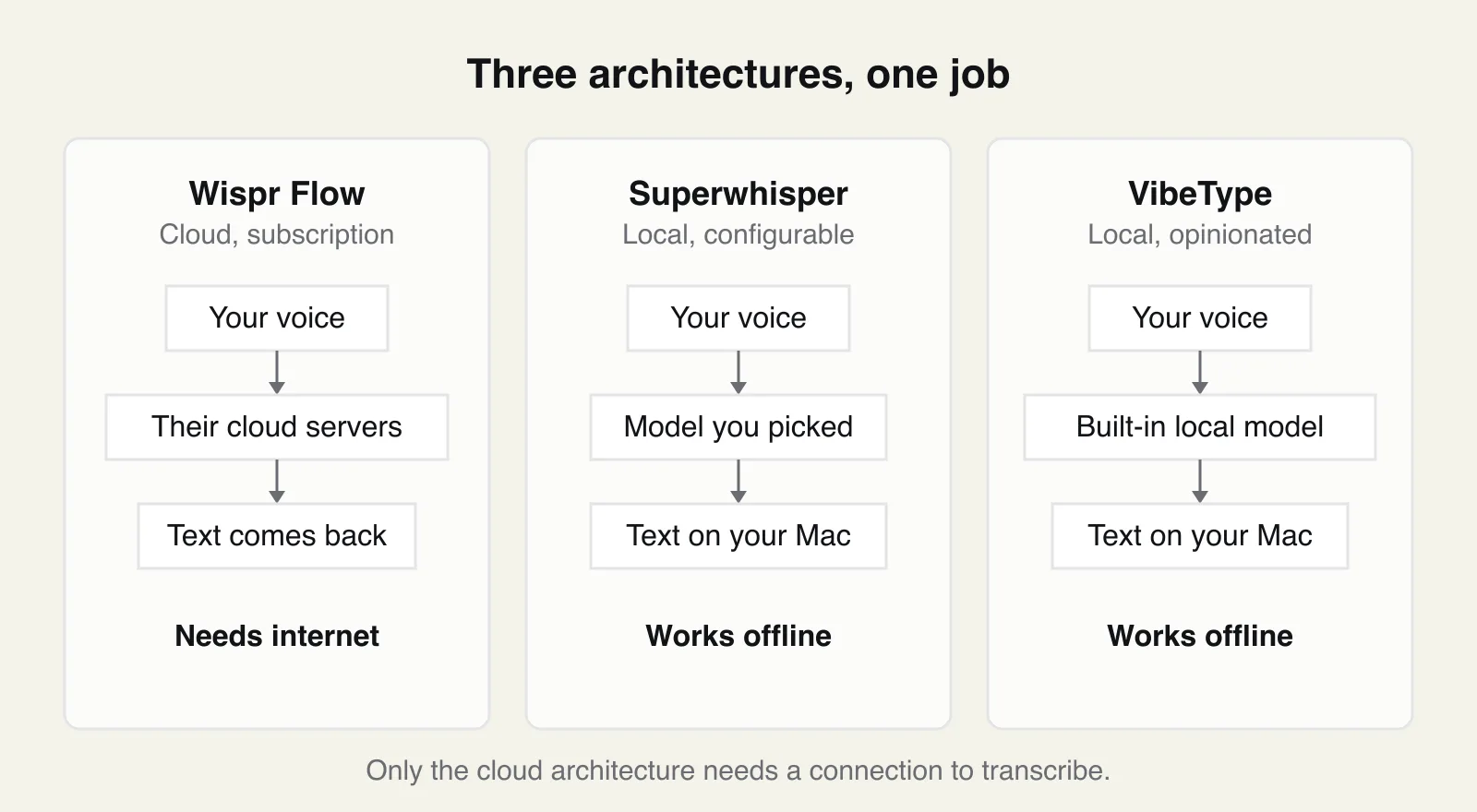
Feature tables age fast; architecture doesn't. Wispr Flow transcribes in the cloud, which buys it large server-side models, context features, and effortless parity across platforms — and commits it to a network dependency, to your audio transiting their infrastructure, and to a meter that runs every time you speak, which is why the pricing must recur. Superwhisper and VibeType both run models on your Mac, which buys offline operation and privacy by construction — and commits your own hardware to doing the work.
Within the local pair, the split is philosophy. Superwhisper hands you the model list, the modes, and the configuration surface; quality is in your hands, and so is the complexity. VibeType picks the model and the tuning for you and gives you one held key. Which is better depends entirely on whether you enjoy the configuring. Community threads describe Superwhisper's setup as "like configuring a server" — its fans say that approvingly.
I haven't benchmarked them, so test them yourself
I am not going to print accuracy percentages. I have not run a controlled benchmark across the three, and vendor-run benchmarks — mine included — deserve your suspicion anyway. What I can give you is the test I would run, in each tool's own trial or free tier, in a single sitting:
Dictate an email you owe someone this week.
Dictate a chat message containing a colleague's name and a product name.
Speak a list ("one… two… three") and see whether it formats.
Dictate a code comment or commit message with identifiers in it.
Dictate a jargon-heavy paragraph from your field.
Score four things per tool: how much you edited after insertion, whether the names survived, the wait between finishing speaking and text appearing, and what happened to your fillers and restarts. Thirty minutes of this beats any table I could publish, because dictation accuracy is dominated by your voice, your vocabulary, and your microphone — three variables no reviewer shares with you. (VibeType's trial runs 30 days and asks for no card, so testing costs you nothing on my side.)
Setup, compared by steps rather than stopwatch
I can describe the steps; I have not timed strangers doing them. Wispr Flow: create an account, grant microphone and accessibility permissions, dictate. Superwhisper: install, then choose — which model, which size, which modes — before the first dictation feels settled. VibeType: install, grant the same two macOS permissions, hold Right Option and talk; there is no model choice, which is the point, and the limitation if you wanted one.
One step is shared and worth knowing about in advance: macOS requires the Accessibility permission for any app that inserts text system-wide, so all three ask for it. The prompt is the operating system working as designed rather than a red flag — that permission is what lets dictated text land in whatever app your cursor is in.
The pricing math over one, three, and five years
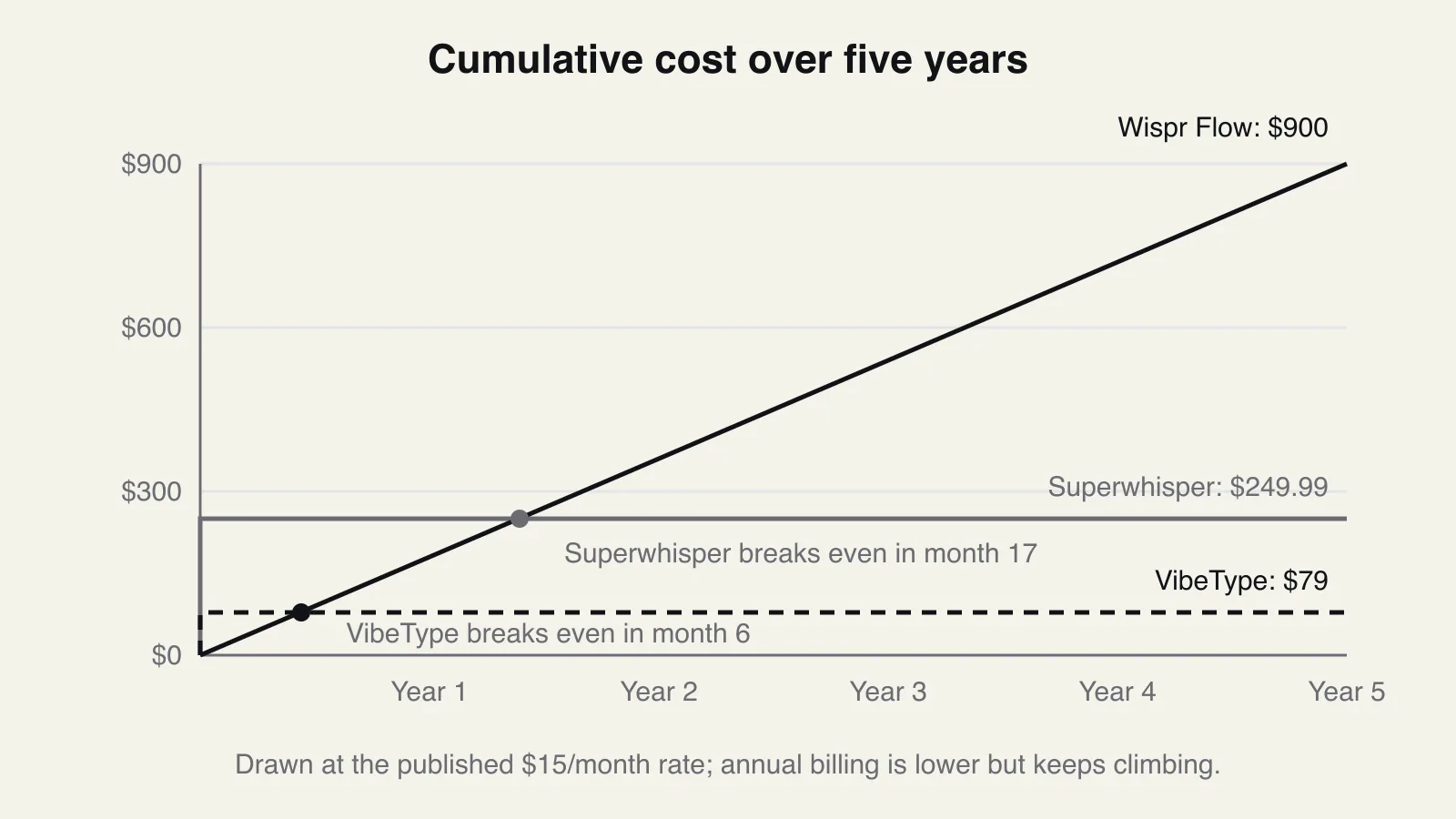
Published prices, arithmetic only. Wispr Flow at $15 a month is $180 a year, $540 over three, $900 over five; annual billing discounts that (a Hacker News user cited $110 a year before canceling), but the total keeps climbing. Superwhisper is $249.99 once — against the monthly rate it breaks even in the seventeenth month. VibeType is $79 once, breaking even in the sixth month; or $29 a year, which stays the cheaper option until just before year three (three years of annual is $87 against the $79 lifetime).
One caveat on Superwhisper's free tier: it restricts you to small models, and small models trade accuracy for size. Evaluating local dictation on them will convince you the whole category is worse than it is. Compare paid tier against paid trial or you are comparing nothing.
Vocabulary: three routes to the same goal
All three vendors know general models miss your names and jargon; they differ in the fix. Wispr Flow builds context in the cloud about what you are writing — the same context features behind the privacy thread I discussed in Wispr Flow alternatives. Superwhisper exposes vocabulary and mode configuration that you set up yourself. VibeType learns from corrections: fix "And Tropic" to "Anthropic" once, and the dictionary holds it from then on, stored on-device.
The mechanics matter more than the marketing. A per-user dictionary works because your working vocabulary is small and stable — a few hundred names and terms cover almost everything you say at work — so correcting each one once converges within a week or two. That is also why "which tool is most accurate" has no single answer: after the dictionary converges, the errors that remain are the ones you personally trained away in one tool and not another.
Who should pick which
Pick Wispr Flow if you need Windows and iPhone today, or you are deploying to a team that wants admin controls. The subscription and the cloud are the cost of that coverage, and for those buyers it is a fair trade. Pick Superwhisper if you want local processing and you enjoy choosing models — the $249.99 amortizes over years of use, and the control is unmatched in this category. Pick VibeType if you want local by default with nothing to configure, at the lowest price of the three, and you accept macOS-only with Windows and mobile on a waitlist. I priced the whole category's models against each other in What should dictation software cost?
The buying mistake I see most often is deciding from a single impressive demo — all three demo well, because a demo is short prose in a quiet room. If you are still unsure, run the five-task test above in each trial instead. Your voice, your vocabulary, and your microphone will settle in thirty minutes what my table cannot.
Frequently asked questions
Is Superwhisper's free tier good enough?
For evaluating the feel of local dictation, yes; for judging its accuracy, no. The free tier limits you to small models, which trade accuracy for size, so treat its output as a floor. The paid tier's larger models are the fair comparison against Wispr Flow's cloud output or VibeType.
Which is cheapest over three years?
VibeType, at $79 once (or $87 on the annual plan). Superwhisper is $249.99. Wispr Flow at its published monthly rate totals about $540 — less with annual billing, but still several times either lifetime. The arithmetic is the easy part; the harder question is whether you need what the subscription uniquely buys, which is cross-platform coverage and team administration.
Do all three work in any app?
Yes. System-wide insertion is the core function of all three: you dictate wherever your cursor is — mail, chat, documents, editors, terminals. The differences are in how insertion happens. VibeType, for instance, uses the clipboard briefly to insert and then restores whatever your clipboard previously held.
Which works offline on a plane?
Superwhisper and VibeType. Both transcribe on your Mac, so airplane mode changes nothing. Wispr Flow needs the internet because transcription happens on its servers. This is the cleanest single test of the architectural difference: turn off Wi-Fi and hold the hotkey.
Can I switch tools without losing my custom vocabulary?
You will rebuild it rather than move it — as far as I know, none of the three imports another's dictionary. The rebuild is faster than it sounds: your working vocabulary is a few hundred names and terms, and in VibeType each needs correcting exactly once. A week of normal dictation covers most of it.